Creating Container Spaces
You create Container Spaces using your preferred hosted development environment.
Use the PairSpaces CLI to create an authorization token. Your development environment will use this token to identify itself as a Space you own. Use pair spaces authorize to do this.
> pair spaces authorize
Select users to share your Space with.
↑/↓ to move, space to select, enter to confirm, q to cancel.
2 items
> [ ] alice@pairspaces.com
> [ ] bob@pairspaces.com
↑/k up • ↓/j down • / filter • q quit • ? more
Press q to cancel.
> pair spaces authorize
Select users to share your Space with.
↑/↓ to move, space to select, enter to confirm, q to cancel.
2 items
> [ ] alice@pairspaces.com
> [ ] bob@pairspaces.com
↑/k up • ↓/j down • / filter • q quit • ? more
Press q to cancel.
> pair.exe spaces authorize
Select users to share your Space with.
↑/↓ to move, space to select, enter to confirm, q to cancel.
2 items
> [ ] alice@pairspaces.com
> [ ] bob@pairspaces.com
↑/k up • ↓/j down • / filter • q quit • ? more
Press q to cancel.
And the authorization token is saved to a file in your current directory.
> pair spaces authorize
You're ready to bootstrap your Space "dynamic_stark".
Your Space's token is valid for 1 hour and is available from SPACE_ID.txt.
> pair spaces authorize
You're ready to bootstrap your Space "dynamic_stark".
Your Space's token is valid for 1 hour and is available from SPACE_ID.txt.
> pair.exe spaces authorize
You're ready to bootstrap your Space "dynamic_stark".
Your Space's token is valid for 1 hour and is available from SPACE_ID.txt.
The contents of the file SPACE_ID.txt is used to configure your hosted development environment.
Devcontainers is an open specification to define coding environments.
The Development Container specification uses a JSON configuration file to define containers. To run pair spaces bootstrap from a Devcontainer we provide a Devcontainer Feature publicly. This .devcontainer.json file describes how to bootstrap a Devcontainer.
{
...,
"features": {
"ghcr.io/pairspaces/devcontainers/pairspaces": {
"token": "[CONTENTS OF `SPACE_ID.txt` HERE]"
}
},
"postStartCommand": "supervisord -c /etc/supervisor/supervisord.conf",
"postAttachCommand": "/opt/pair/pair spaces bootstrap",
"remoteUser": "root",
...
}
To complete this configuration include the output from pair spaces authorize in the token field.
We used GitHub Codespaces to develop this approach. This approach should be general enough to work elsewhere, but contact us (support at pairspaces dot com) if you experience challenges using PairSpaces with your Devcontainer.
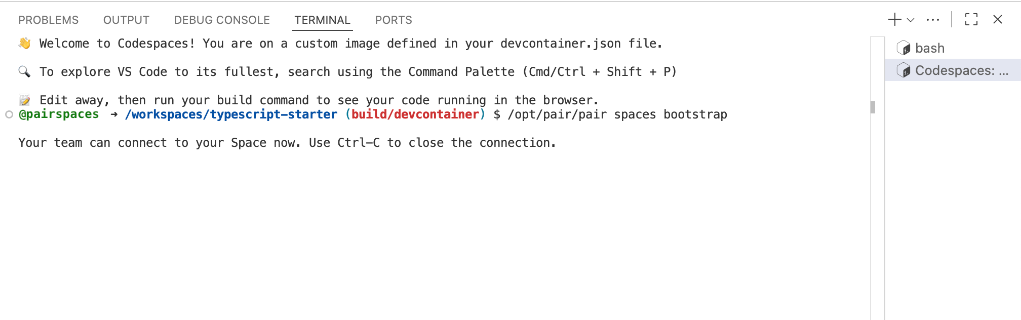
After you create your Codespace, the Dev Container feature will complete in a few seconds in a separate terminal.
Devfile is an open standard for defining containers and used to produce consistent and reproducible development environments.
The Devfile standard uses a YAML configuration file to define containers. To run pair spaces bootstrap from a Devfile we recommend the following Devfile.
schemaVersion: 2.2.0
metadata:
name: devenv
components:
- name: devenv
container:
image: node:18
mountSources: true
command: ['sleep']
args: ['infinity']
commands:
- id: install-pair
exec:
component: devenv
commandLine: curl -fsSL https://raw.githubusercontent.com/pairspaces/devfiles/main/install.sh | bash
group:
kind: run
- id: start-supervisord
exec:
component: devenv
commandLine: supervisord -c /etc/supervisor/supervisord.conf
group:
kind: run
- id: bootstrap
exec:
component: devenv
commandLine: |
while [ ! -x /opt/pair/pair ]; do sleep 1; done
/opt/pair/pair spaces bootstrap "[CONTENTS OF `SPACE_ID.txt` HERE]"
workingDir: /projects
group:
kind: run
isDefault: true
events:
postStart:
- install-pair
- start-supervisord
- bootstrap
The devenv component represents your own image. To successfully bootstrap a Devfile container, include the commands and events in your own Devfile.
We used AWS CodeCatalyst to develop this approach, but the Devfile standard is adopted differently on different platforms. This approach should be general enough to work elsewhere, but contact us (support at pairspaces dot com) if you experience challenges using PairSpaces with your Devfile.
You can delete Container Spaces from the PairSpaces web application. Navigate to Spaces and click the trash icon () .
You have one Container Space.
Container Spaces
| Name | Status | |
|---|---|---|
dynamic-stark | Stopped |